

Lab:FEI-L00-ENUMERATION
拿到 shell 之後,很多人的第一反應是 Google「Linux privilege escalation exploit」。
但這就像走進一棟你從沒去過的大樓,第一件事不是找逃生口,而是先看看你在哪一層、有幾個出口、門鎖是什麼型號。
Enumeration(列舉) 是提權的第一步,也是最重要的一步。它的目標不是「找到答案」,而是「問對問題」。
在 MITRE ATT&CK 的 Tactic 中,這對應的是:
LinPEAS、linEnum 這類工具很好,但如果你只是跑工具看輸出,你不會理解:
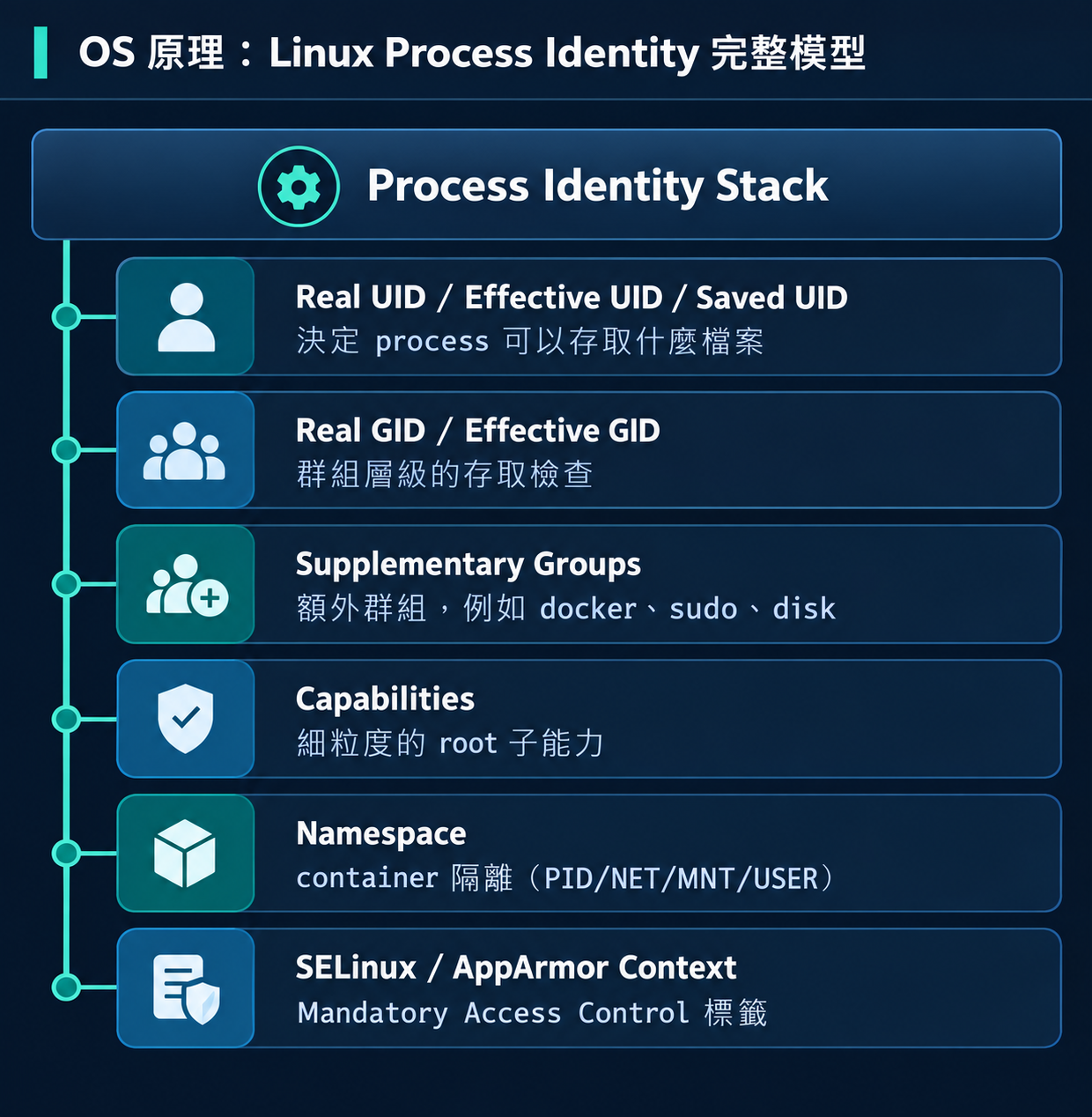
Linux 的權限不只是「你是誰」,而是一整套 Process Identity:
在 Enumeration 時,我們至少需要確認前四層。
SSH(Secure Shell)是遠端登入 Linux 的標準方式。從你的 Windows Host 打開 PowerShell:
ssh fei-student@192.168.77.10
輸入密碼 FEI-Student-2026!(打字時不會顯示,這是正常的)。
如果你的 Windows 沒有 SSH,也可以直接在 VMware 視窗中操作。
| 指令 | 用途 | 範例 |
|---|---|---|
ls |
列出目錄內容 | ls -la /opt/ |
cd |
切換目錄 | cd /opt/fei-privesc/ |
cat |
顯示檔案內容 | cat /etc/passwd |
grep |
搜尋文字 | grep "password" config.txt |
find |
搜尋檔案 | find / -name "*.conf" |
sudo |
以其他身份執行 | sudo whoami |
 FEI Lab 環境
VM:       FEI-PRIVESC-LINUX
OS:       Ubuntu 22.04.4 LTS
Kernel:   5.15.0-94-generic
IP:       192.168.77.10
帳號:     fei-student(Standard User,無 sudo)
目標:     建立完整的環境認知
Flag:     無(這題沒有 flag,是純 enumeration 練習)
# 1. 以 fei-labadmin 登入(SSH 或 VMware Console)
ssh fei-labadmin@192.168.77.10
# 密碼:FEI-LabAdmin-2026!

# 2. 進入場景目錄並 setup
cd /opt/fei-privesc/scenarios/FEI-L00-ENUMERATION
sudo ./fei-setup.sh

# 3. 確認場景就緒
sudo ./fei-verify.sh
# 應看到 FEI-L00 STATUS: READY

# 4. 切換到 fei-student(攻擊者視角)
su - fei-student
# 密碼:FEI-Student-2026!
# fei-labadmin 執行 setup
sudo ./fei-setup.sh
# setup 確認 fei-student 是乾淨的低權限帳號
# 不建立任何漏洞
# 只確保 enumeration 工具可用

# verify 確認
sudo ./fei-verify.sh
# [PASS] fei-student exists
# [PASS] fei-student is not root (UID != 0)
# [PASS] fei-student is not sudoer
# [PASS] fei-student is not in docker group
# [PASS] expected enumeration tools exist
# [PASS] FEI directory exists (/opt/fei-privesc)
# [PASS] no intended privilege escalation path exists
# FEI-L00 STATUS: READY
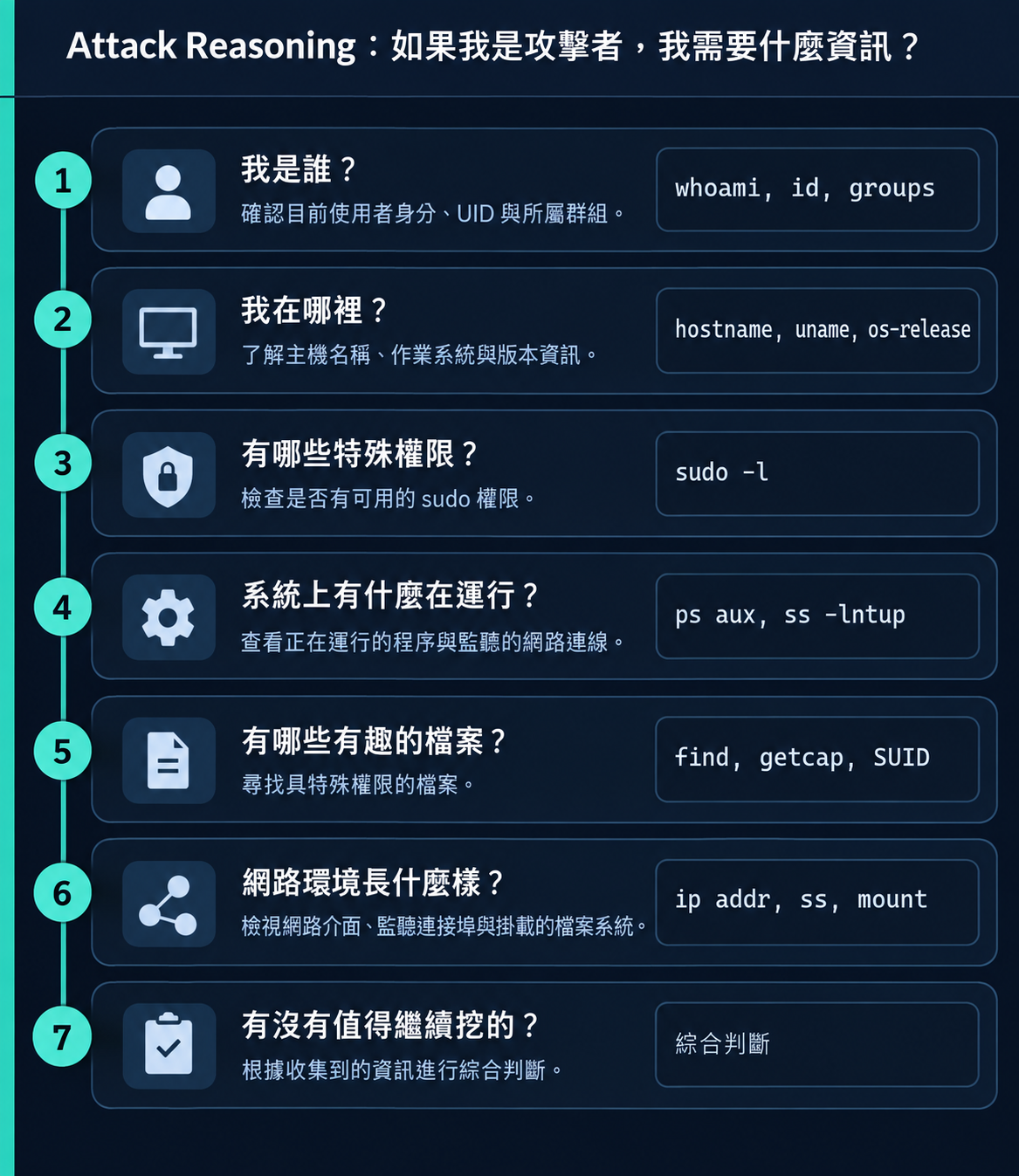
每一個 Enumeration command 都應該回答一個具體問題:
以下是 fei-student 在 FEI Lab 上的實際執行結果。
fei-student@fei-privesc-linux:~$ whoami
fei-student

fei-student@fei-privesc-linux:~$ id
uid=1001(fei-student) gid=1001(fei-student) groups=1001(fei-student)
解讀:
fei-student@fei-privesc-linux:~$ hostname
fei-privesc-linux

fei-student@fei-privesc-linux:~$ uname -a
Linux fei-privesc-linux 5.15.0-94-generic #104-Ubuntu SMP Tue Jan 9 15:25:40 UTC 2024 x86_64 x86_64 x86_64 GNU/Linux

fei-student@fei-privesc-linux:~$ cat /etc/os-release | head -3
PRETTY_NAME="Ubuntu 22.04.4 LTS"
NAME="Ubuntu"
VERSION_ID="22.04"
解讀:
fei-student@fei-privesc-linux:~$ sudo -l
sudo: a terminal is required to read the password
解讀:fei-student 需要密碼才能查 sudo 權限。如果輸入密碼:
fei-student@fei-privesc-linux:~$ sudo -l
[sudo] password for fei-student:
Sorry, user fei-student may not run sudo on fei-privesc-linux.
結論:fei-student 不是 sudoer。沒有 sudo 提權路徑。
fei-student@fei-privesc-linux:~$ ss -lntup
Netid State  Recv-Q Send-Q Local Address:Port Peer Address:Port
udp   UNCONN 0      0      127.0.0.53%lo:53        0.0.0.0:*
tcp   LISTEN 0      4096   127.0.0.53%lo:53        0.0.0.0:*
tcp   LISTEN 0      128          0.0.0.0:22        0.0.0.0:*
tcp   LISTEN 0      128             [::]:22           [::]:*
解讀:
# SUID binaries
fei-student@fei-privesc-linux:~$ find /usr -perm -4000 -type f 2>/dev/null
/usr/bin/newgrp
/usr/bin/sudo
/usr/bin/umount
/usr/bin/chfn
/usr/bin/gpasswd
/usr/bin/mount
/usr/bin/passwd
/usr/bin/pkexec
/usr/bin/chsh
/usr/bin/su
/usr/bin/fusermount3
/usr/libexec/polkit-agent-helper-1
/usr/lib/snapd/snap-confine
/usr/lib/openssh/ssh-keysign
/usr/lib/dbus-1.0/dbus-daemon-launch-helper
解讀:全部都是系統標準 SUID binary。沒有異常。
# Capabilities
fei-student@fei-privesc-linux:~$ getcap -r /usr/bin 2>/dev/null
/usr/bin/ping cap_net_raw=ep
/usr/bin/mtr-packet cap_net_raw=ep
解讀:只有 ping 和 mtr-packet 有 cap_net_raw。正常,不能用於提權。
fei-student@fei-privesc-linux:~$ ip addr | grep 192.168.77
    inet 192.168.77.10/24 brd 192.168.77.255 scope global ens97
解讀:Host-Only 網路,192.168.77.10。
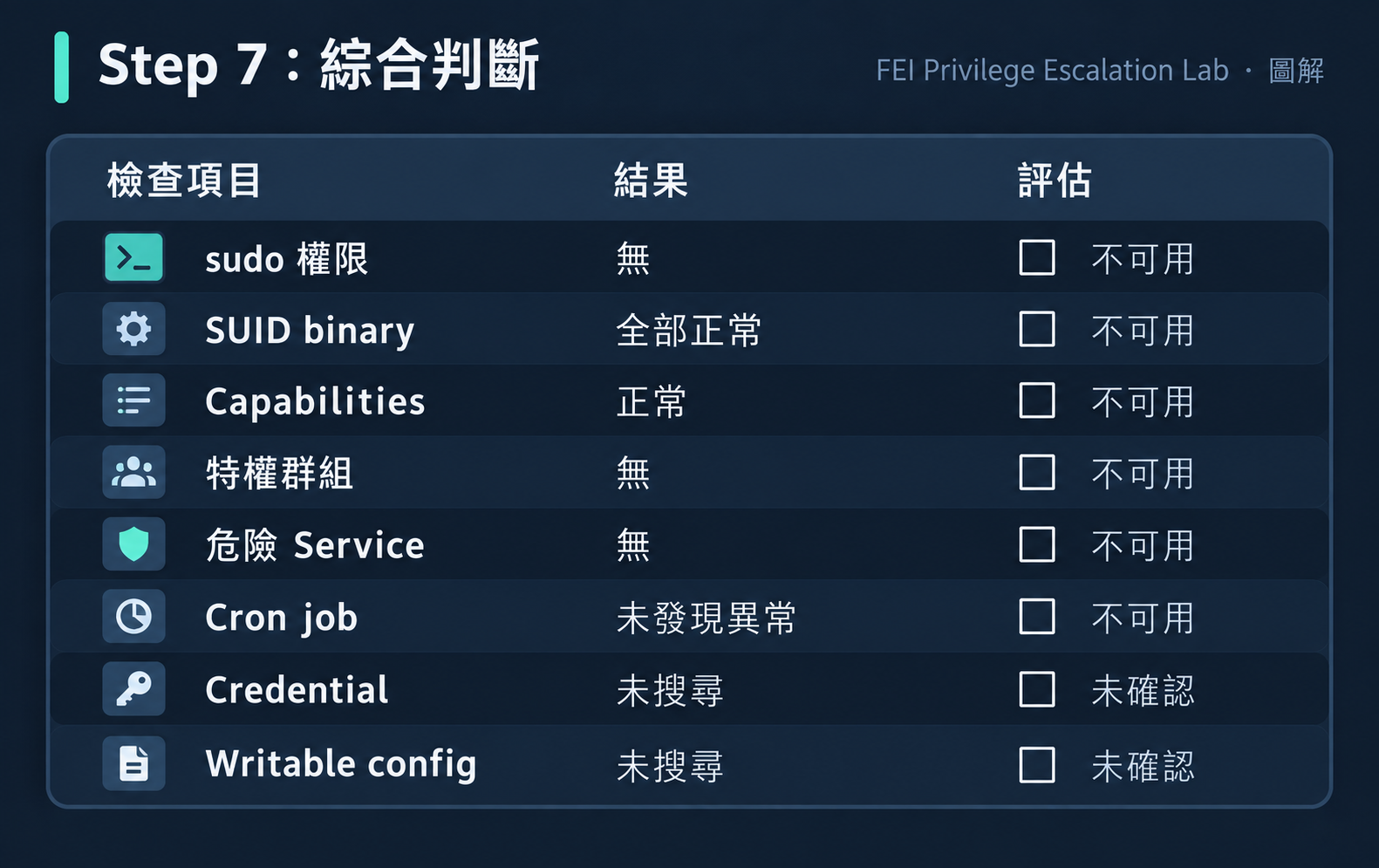
結論:這是一台乾淨的 Lab 環境。L00 場景故意不建立任何漏洞——目的是練習 Enumeration 流程本身。
| 發現 | 為什麼不是漏洞 |
|---|---|
/usr/bin/sudo 有 SUID |
sudo 本來就需要 SUID 才能工作。SUID sudo ≠ 你有 sudo 權限 |
/usr/bin/pkexec 有 SUID |
CVE-2021-4034 (PwnKit) 在 Ubuntu 22.04 已修補 |
/usr/lib/snapd/snap-confine 有 SUID |
snapd 正常運作需要,已修補已知漏洞 |
ss 顯示 port 22 開放 |
SSH 開放不代表可以暴力破解或有密碼重用 |
fei-labadmin 在 sudo 群組 |
那是 labadmin 的權限,不是你的 |
| 差異 | 影響 |
|---|---|
CentOS/RHEL 用 crond 而非 cron |
systemctl 的 service name 不同 |
Alpine Linux 沒有 bash |
只有 sh,很多指令語法不同 |
有些系統 getcap 不存在 |
需要另外安裝 libcap2-bin |
Container 環境可能沒有 ss |
改用 netstat 或 /proc/net/tcp |
| 問題 | 原因 | 解法 |
|---|---|---|
sudo -l 顯示要密碼 |
fei-student 不在 sudoers | 輸入你的密碼。如果顯示 not allowed,代表沒有 sudo 權限(正常) |
find 輸出太多 Permission denied |
很多目錄你沒有讀取權限 | 加 2>/dev/null 過濾錯誤輸出 |
getcap -r / 很慢 |
遍歷整個 filesystem | 縮小範圍:getcap -r /usr /opt 2>/dev/null |
id 顯示在 disk 群組但 debugfs 失敗 |
group membership 改變後需要重新登入 | logout 再 login |
監控以下行為模式:
find / grep / cat 操作/etc/shadow、/etc/sudoers 嘗試getcap、find -perm -4000 等 SUID/Capability 搜尋/proc 資訊蒐集# auditd 規則範例:監控 enumeration
-w /etc/shadow -p r -k shadow_read
-w /etc/sudoers -p r -k sudoers_read
-a always,exit -F arch=b64 -S execve -F path=/usr/sbin/getcap -k capability_enum
/proc 的可見性(hidepid=2)# 確認 fei-student 沒有不必要的權限
id fei-student
# 預期:只有自己的群組
sudo -l -U fei-student
# 預期:not allowed to run sudo
find / -perm -4000 -user root -type f 2>/dev/null | grep -v '/usr/'
# 預期:沒有非系統的 SUID binary
| 行為 | Log 來源 | 指標 |
|---|---|---|
sudo -l 嘗試 |
/var/log/auth.log | pam_unix(sudo:auth) |
大量 find 執行 |
auditd / bash_history | 頻繁的 -perm -4000 |
| 讀取 sensitive files | auditd | 存取 /etc/shadow、/etc/sudoers |
| Process enumeration | /proc access | 大量讀取 /proc/*/cmdline |
確認 Enumeration 不會洩漏不必要的資訊:
# /proc 可見性
mount | grep hidepid
# 建議:hidepid=2

# bash history 保護
ls -la /home/fei-student/.bash_history
# 建議:history 不應保存敏感 command

# 確認沒有不必要的 SUID
find / -perm -4000 -not -path '/usr/*' -type f 2>/dev/null
# 預期:空
完整 Enumeration 練習:在 FEI Lab 上以 fei-student 完成 7 步 Enumeration。把每一步的結果記錄在筆記中。
建立你的 Enumeration Checklist:根據今天學的流程,寫一份你自己的 Linux Enumeration Checklist。每一項都要有「為什麼要查」的理由。
False Positive 辨識:在你的 Lab 上找到所有 SUID binary。其中哪些是正常的?哪些值得進一步調查?標準是什麼?
Q1:Enumeration 的主要目的是?
答案(B) Enumeration 是收集資訊並形成假設的過程。
Q2:id 和 whoami 的差別是?
id 提供 UID、GID、Groups 等完整資訊,whoami 只顯示使用者名稱whoami 更詳細id 需要 root 權限答案(B) id 比 whoami 資訊量大得多。
Q3:在 FEI Lab 上看到 /usr/bin/sudo 有 SUID bit,這代表?
答案(B) sudo 需要 SUID 才能切換使用者。SUID sudo ≠ 你有 sudo 權限。
Q4:find / -perm -4000 2>/dev/null 做了什麼?
答案(B) -perm -4000 搜尋 SUID bit,2>/dev/null 隱藏錯誤輸出。
FEI-L00 是整個系列中最「乾淨」的場景。它故意不建立任何漏洞。
這個設計決定很重要:如果學員連「沒有漏洞」的環境都能完整列舉、正確判斷「這裡沒有明顯的提權路徑」,那他們在面對真正有漏洞的環境時,才能準確辨識出異常。
在 FEI Lab 的 verify 中,我們特別檢查了「no intended privilege escalation path exists」:
[PASS] fei-student is not sudoer
[PASS] fei-student is not in docker group
[PASS] expected enumeration tools exist
[PASS] no intended privilege escalation path exists
確保這真的是一個乾淨環境,不是「我們以為乾淨但其實有 unintended path」。
做完後記得 reset,避免影響下一題:
# 以 fei-labadmin 執行
ssh fei-labadmin@192.168.77.10
cd /opt/fei-privesc/scenarios/FEI-L00-ENUMERATION
sudo ./fei-reset.sh
sudo ./fei-verify.sh --reset
# 應看到 FEI-L00 STATUS: RESET
Enumeration 是回答問題,不是背指令。每個 command 都要有「為什麼現在要執行它」的理由。
看到 SUID / Capability / sudo 不代表可以提權。要判斷「誰的」「能做什麼」「是否正常」。
系統性比速度重要。按照 7 步流程走,比亂跑工具更有效。
L00 是乾淨環境。但如果在 Step 3 中,
sudo -l突然顯示你可以用 root 執行/usr/bin/find——你會怎麼想?你下一步會做什麼?
Day 05:sudo 不是漏洞:真正危險的是「你被允許執行什麼」——L01 正好就會出現剛才那個 sudo find 的情境。



 iThome鐵人賽
 看影片追技術